


Creating chamfers
A chamfer is a line object that connects two nonparallel lines or polylines. The connected lines or polylines are trimmed or extended if necessary.
There are two methods to create a chamfer: by specifying two distances and by distance and angle.


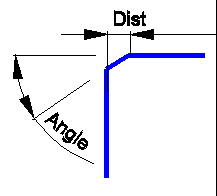
Original objects  Chamfer by two distances Chamfer by distance and angle
To create a chamfer:
1. Select two vector lines.
2. Choose Correct > Create Chamfer or press  button on the Vector Correction toolbar.
3. Choose chamfer creation method in the Chamfer method field of the Inspector window. Specify two distances or an angle and distance.
4. Using the mouse, select one of the chamfers.

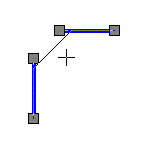

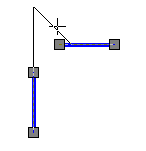
Following the mouse, WiseImage offers several positions for the chamfer
5. Set Correct vectors to FALSE if lines are not to be extended or trimmed; otherwise set TRUE.


Correct vectors is FALSE Correct vectors is TRUE
6. Click ESC to finish chamfer creation or choose Exit from the right button menu.
Feedback

Post your comment on this topic.